Turn every reply into a next step: classify, route, and respond with human-approved drafts so hot leads get answers in hours, not days.
11 min read
Table of contents
- Where to Next
- Step 1: Classify Every Reply
- Step 2: Route Every Class to One Action
- Step 3: Respond with Grounded Drafts
- The SLA: Classified in One Cycle, Drafted Before You Ask
- Audit Your Reply Handling in 30 Minutes
- Related reading
- Frequently Asked Questions
- What reply classes exist in cold outreach?
- Should AI reply to interested leads automatically?
- What happens when a prospect replies with an out-of-office?
- How should unsubscribe and data deletion requests be handled?
- What is an intent score for email replies?
- How fast are replies classified and drafted?
Replies from a cold campaign pile up faster than anyone answers them. Interested buyers wait a business day, out-of-offices never resume, and one careless auto-reply to an unsubscribe request can put your domain at risk. The fix is a fixed playbook: every reply gets a class, and every class gets one predetermined route. When every reply that lands has a next action, nothing sits in an inbox until someone "gets to it," and nothing risky goes out without a human.
Email reply classification is the step where an inbound reply is labeled by type, sentiment, and intent, so the next action becomes a rule instead of a judgment call. The playbook has three steps: classify, route, respond. Each step has a fixed rule and a stated speed. The full class taxonomy, with sentiment and intent grading, is in JEV reply classification. Reachfold runs it with a rule prefilter for the obvious cases plus a decision model for everything else, then routes on the label.
Key Takeaways
- Every reply maps to a fixed class, plus sentiment and an intent grade that puts the hottest threads on top.
- The routing table is the artifact: each class gets exactly one fixed action, marked auto or human.
- Compliance classes never get agent treatment: unsubscribe and bounce are not processed by the agent, and a data deletion request stops outreach and routes to a human process.
- Meeting requests are always human-approved; the agent sends your booking link, never books.
- Classify within one processing cycle, and have drafts ready before anyone opens the thread.
Where to Next
- Building the routing table for the first time → what an AI reply agent should and shouldn't do alone
- Handling vacation auto-replies → out-of-office reply strategy: what to automate
- Merging email and LinkedIn replies → one unified inbox for outreach replies
Step 1: Classify Every Reply
Classification turns a paragraph of prose into a label the system can act on. Use a rule prefilter for the obvious cases (bounces, out-of-offices, unsubscribes) and a decision model for everything else; Reachfold's classifier works exactly that way. Every reply gets three outputs: Reachfold's free Email Verifier runs these same domain-level checks on any address in seconds.
- Class: interested, meeting_request, question, neutral, not_interested, out_of_office, unsubscribe, data_deletion_request, or bounce.
- Sentiment: positive, neutral, negative, or redirect ("talk to my colleague").
- Intent: how strongly the reply signals pipeline movement, so the hottest threads surface first.
A long class list sounds like a lot until you try four. "Positive" isn't an action; "interested, route to draft" is. In practice most of a campaign's replies collapse into a handful of classes. The granularity exists so routing can be mechanical, and mechanical routing is what lets an agent act without supervision on the safe cases.
Step 2: Route Every Class to One Action
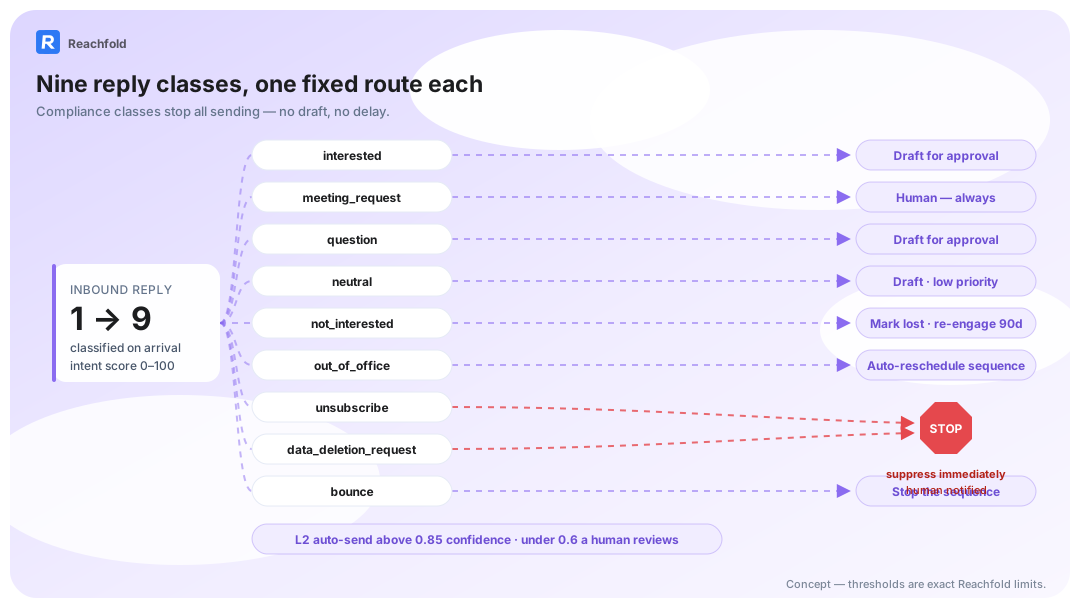
This table is the artifact. Print it, argue about it once, and never improvise a route again.
| Class | What it means | Route and action | Auto or human |
|---|---|---|---|
| interested | Prospect wants to keep talking | Reply drafted from your knowledge base; in semi-auto mode only certain replies auto-send | Auto in semi-auto when certain, otherwise human |
| meeting_request | Prospect proposes a call | Agent sends your booking link; it never books | Human, always |
| question | Asks about product, pricing, or fit | Draft grounded in the knowledge base and objection matrix; in semi-auto mode only certain replies auto-send | Auto in semi-auto when certain, otherwise human |
| neutral | Acknowledges without committing | Draft at low priority | Human |
| not_interested | Says no | Marked Lost; re-engagement auto-scheduled at +90 days with a softer campaign | Auto in semi-auto; interval configurable, can disable |
| out_of_office | Away, maybe with a return date | Parser reads the date, pauses the sequence to the timezone-normalized return, drafts re-engagement | Auto in semi-auto; unparseable date: 7-day pause + human triage |
| unsubscribe | Asks to stop email | Not processed by the agent; the system suppresses all further sending | System stop, no agent |
| data_deletion_request | Asks you to delete their data | Outreach stops; request routes to a human process; never auto-replied | Human, always |
| bounce | Address is dead | Not processed by the agent; sequence stops and the address is removed | System stop, no agent |
Three classes never touch the agent. Unsubscribe and bounce are not processed by the agent at all: the system suppresses the address or stops the sequence directly, because a sales model has nothing to add to a legal stop (FTC, CAN-SPAM Act compliance guide). A data_deletion_request goes further: outreach stops, the request routes to a human process for confirmation, and the class is never auto-replied. Compliance is not a tuning surface.
not_interested gets the one scheduled second act. The lead closes to Lost, and a re-engagement campaign is auto-created for 90 days out with a softer template. The interval is user-configurable, and you can disable re-engagement per workspace if a clean no should stay a no.
Out-of-office shows how far a safe class can go. The rescheduler reads return dates the way you would ("back next Monday"), pauses the sequence to the timezone-normalized date, and queues a re-engagement draft for the return. A date it can't parse never gets guessed at: seven-day pause, human triage.
The table is the policy. Everything downstream is execution. The same routing holds when replies arrive from LinkedIn instead of email; multichannel reply management merges the streams into one inbox.
The pain this table fixes is easy to recognize: a shared inbox where an interested buyer sits between a bounce and a newsletter, and nobody opens the thread until the deal has gone quiet. The fix is running that rule mechanically on every inbound reply. That's the gate we run on every campaign: every reply lands with a class, a draft, and one next action before a human ever looks at it.
Step 3: Respond with Grounded Drafts
A classified reply still needs words, and the words come from your material, not the model's imagination. Two inputs feed every draft:
- The product knowledge base. Fill three fields before you let any agent draft: product description, pricing and integrations, and common objections. Answers then quote your positioning and your numbers. In Reachfold, the agent stays disabled until those fields are filled.
- The objection matrix. Known objections map to approved responses, so "we already use X" gets a consistent, reviewable answer instead of fresh improv every time. How to build and maintain that matrix is in AI objection handling.
Humans stay in the loop where it counts. Every draft lands in the Need-Approval inbox with Approve All, inline editing, and Regenerate. In semi-auto mode, only safe classes act automatically, and only when the engine is certain about them. Anything ambiguous, or anything the risk check flags, drops to the manual-review queue. Long threads stay in full context, and the level you chose holds at any length; an episodic summary keeps them reviewable instead.
Replies also respect channel limits: email replies cap at 150 words, LinkedIn replies at 50. The full boundary set lives in AI reply agent autonomy limits, and the human-in-the-loop agent page shows the approval flow end to end.
Grounded drafts, gated autonomy. That's how replies scale without the brand risk.
The risk that keeps founders up is the careless auto-reply: an unsubscribe answered by a template, or a curt prospect answered by an agent on a bad day. The routing table already settles it: compliance classes never reach the agent, and meeting requests always wait for a human. That's the second gate we run on our own campaigns every week, and it's why the send button stays yours.
The SLA: Classified in One Cycle, Drafted Before You Ask
Speed in reply handling comes from two design choices. First, classification completes within the processing cycle: the rule prefilter settles the mechanical classes (bounce, out-of-office, unsubscribe) without a model call, and the decision model labels everything else in the same pass. Nothing waits for a nightly batch.
Second, drafts are produced proactively. A classified reply doesn't sit as a label; it becomes a "Draft ready" item in the Need-Approval inbox, grounded in your knowledge base, before anyone opens the thread. Your team clears a queue instead of composing from scratch. That trade is the core of AI SDRs with human approval: the machine works while you're away, and the send button stays yours.
The two slow clocks that remain are deliberate. An out-of-office with an unreadable date pauses seven days for human triage rather than resuming on a guess, and a not_interested lead waits out the full re-engagement interval (90 days by default) before the softer campaign runs. Slow where being wrong is costly, fast everywhere else.
The overnight pile-up is the version of this pain most teams know best: forty replies land while you sleep, half need nothing, three are ready to buy, and the order you open them in decides the quarter. A classifier that labels and drafts in the same cycle turns that pile into a queue sorted by intent. We run that gate on every campaign we send: hot threads on top, safe replies already drafted, nothing risky out the door unsupervised.
Audit Your Reply Handling in 30 Minutes
- Minutes 0-5: pull your last 50 replies. Any source; a CSV export works.
- Minutes 5-15: label each by hand with the class list above. Flag every reply that took more than a business day to answer.
- Minutes 15-20: write your routing table. One action per class, including the two compliance stops.
- Minutes 20-25: check the meeting lane. Who confirms slots today, and how long does confirmation take? That lag is costing you meetings.
- Minutes 25-30: pick your automation boundary. Which classes would you let a system auto-handle today, and which must always wait for a person? That boundary is your suggest-versus-semi-auto decision.
Thirty minutes exposes the leaks: unanswered interest, OOFs that never resumed, unsubscribes handled "when someone saw them." Fix the table first; automate second. When you're ready to compare plans, Reachfold pricing is one page.
Once the audit shows the leaks, the fix is the routing table from Step 2 running on every inbound reply, with classification, grounded drafts, and human approval in one workflow.
The inbox you can classify is the inbox you can delegate.
One reply class deserves its own playbook: how we handle the out-of-office reply without breaking cadence.
Frequently Asked Questions
What reply classes exist in cold outreach?
Interested, meeting_request, question, neutral, not_interested, out_of_office, unsubscribe, data_deletion_request, and bounce. Together they cover essentially every reply a cold campaign produces. Each class maps to one fixed next action, which is what makes automated reply handling safe: the system is not interpreting prose, it is executing a route you approved for that label.
Should AI reply to interested leads automatically?
Only when the engine is certain about them, and only in semi-auto mode. Interested replies and questions auto-send in semi-auto mode only when the engine is certain; anything ambiguous, or anything the risk check flags, waits in the approval queue. In suggest mode, everything waits for you by default.
What happens when a prospect replies with an out-of-office?
The reply is classified as out_of_office and the agent parses the return date from the text. The sequence pauses until that timezone-normalized date, then a re-engagement draft is prepared. Dates the parser cannot read trigger a seven-day pause and human triage instead of a guess. The thread resumes exactly where the prospect left it.
How should unsubscribe and data deletion requests be handled?
As stops the agent never touches. Unsubscribe and bounce replies are not processed by the agent at all: the system suppresses sending or stops the sequence directly. A data deletion request goes further: outreach stops, the request routes to a human process for confirmation, and the class is never auto-replied (ICO, electronic marketing guidance). Every send after such a request risks complaints, penalties, and domain damage.
What is an intent score for email replies?
An estimate of how strongly a reply signals buying movement, attached to every classification alongside sentiment. Two positive replies can signal very different intent, and that grade tells your team which thread to open first. It prioritizes human attention; it does not replace the classification itself.
How fast are replies classified and drafted?
There's no reason for classification to wait for a nightly batch; ask any vendor how quickly labels and drafts appear. Classification completes within the processing cycle: a rule prefilter settles bounces, out-of-office replies, and unsubscribes without a model call, and a decision model labels the rest in the same pass, each with sentiment and an intent grade. The matching draft is already waiting in the Need-Approval inbox, so review starts from words on the page, not a blank thread.