Diagnose why your emails go to spam: authentication, domain reputation, complaint rates, volume spikes, and list hygiene, with a fix for each cause.
10 min read
Table of contents
- Where to Next
- Test Placement Before You Diagnose Anything
- Broken SPF, DKIM, and DMARC
- A Weak or Damaged Domain Reputation
- Complaints Cross the 0.3% Line
- Volume Spikes Look Like a Spam Run
- Your Warmup Was Synthetic
- Content Triggers Are the Tiebreaker Not the Cause
- Dirty Lists and Hard Bounces
- The Diagnostic Sequence
- Symptoms and Fixes at a Glance
- Gmail, Outlook, and Yahoo Filter You Separately
- Related reading
- Frequently Asked Questions
- How do I know if my emails are going to spam?
- What spam complaint rate is safe?
- Will switching to a new domain fix spam placement?
- Can email content alone send you to spam?
- How long do fixes take to restore inbox placement?
- Can a warmed domain still land in spam?
- Do cold emails need DMARC?
- Why do my emails land in spam only on Outlook?
- Where to Start
Your campaign launches, the tool reports "delivered," and the replies never come. The emails are sitting in spam, and every day they stay there costs you leads you already paid to find. Reachfold's Outbound Cost Calculator does this math for your numbers, free.
It happens for one of seven reasons, and the most measurable has a hard number: Google requires bulk senders to keep complaints below 0.3% (Google, Email sender guidelines). The other six are just as fixable: broken authentication, weak reputation, volume spikes, synthetic warmup, content triggers, and dirty lists. Diagnosis for each, and a fix that works with any tool.
Spam placement means the receiving provider accepted your email and then filtered it out of the inbox: delivery worked, reputation didn't.
Key Takeaways
- Seven causes cover almost every spam problem: authentication, domain reputation, complaint rate, volume spikes, synthetic warmup, content, and list hygiene.
- Google's sender guidelines require bulk senders to stay below a 0.3% spam rate in Postmaster Tools.
- Run a placement test before changing anything; guessing burns domains.
- Fix authentication and list hygiene first — they're mechanical, and filters weigh them hardest.
- Re-test after every fix; no fix counts until the number moves.
Where to Next
- The full audit: the deliverability audit checklist, step by step.
- Authentication first: the SPF, DKIM, and DMARC setup guide.
- Starting clean on a new domain: how to warm up an email domain.
Test Placement Before You Diagnose Anything
A collapsed open rate tells you something's wrong, not what. Run a placement test first: identical emails to seed inboxes across Gmail, Outlook, and Yahoo, scored by folder. That number separates "the copy needs work" from "the domain has a reputation problem." Diagnosis without measurement is folklore.
Most teams learn about placement from a collapsed reply rate weeks later. The fix is the same test run as verification: measure, fix, re-measure. No fix counts until the number moves.
Broken SPF, DKIM, and DMARC
Authentication is the first checkpoint every message passes. SPF says which servers may send for your domain, DKIM signs each message so it can't be altered in transit, and DMARC ties the two to the From domain. The classic failure isn't a missing record — it's misalignment: SPF and DKIM pass, but for a domain that doesn't match the From line, and Gmail reads that as spoofing. Since 2024, Google and Yahoo's bulk-sender rules require all three records, enforced with filtering. Syntax rules: the SPF, DKIM, and DMARC setup guide. Fix a missing or misaligned record before anything else — a 30-minute change that outweighs every copy tweak.
A Weak or Damaged Domain Reputation
Reputation is the provider's memory of your domain: every send, open, reply, complaint, and bounce updates it. A new domain has no memory, which filters treat as risk, not innocence, and a burned domain carries the memory of every spam run before you. Damage repairs on one schedule: low volume, high engagement, weeks of consistency (our domain reputation guide).
Reputation has no shortcut. Only a curve.
Complaints Cross the 0.3% Line
Google's threshold is 0.3% in Postmaster Tools: three complaints per 1,000 emails. Cross it consistently and Gmail starts diverting everything you send, not just the campaign that earned it.
Complaints concentrate where they're easiest to generate: purchased or scraped lists, buried unsubscribe links, and subject lines that oversell what's inside. The countermeasure is mechanical: verify every address, keep a one-click unsubscribe header (RFC 8058), and make leaving as easy as arriving. Every complaint is a recipient you kept when they wanted out.
Volume Spikes Look Like a Spam Run
Filters key on pattern changes. An inbox that sent 15 emails a day for three weeks and 400 on Monday has described a compromised account. The spike alone can trigger filtering, even with clean lists, so ramp deliberately.
In the traditional model, mailboxes warm gradually over about four weeks so providers never see a spike; with real-lead warmup, campaigns start on day one on the same human curve. Either way, mature mailboxes stay under conservative limits. Need capacity? Add inboxes. Don't stretch one.
Ramping by hand is where most spikes come from; Reachfold automates it with built-in email warmup and health guards. Filters punish the shape of your volume, not just its size.
Your Warmup Was Synthetic
This cause hides behind a green dashboard. If your warmup came from a rented pool — strangers' mailboxes opening and replying to each other's warmup mail — the engagement your filters saw belonged to the network, not to you. Campaign day breaks the pattern, and placement pays for the gap.
The fix replaces the source rather than warming longer: real-lead warmup earns replies from your target audience — plain text, zero links, stopping the moment someone answers — so the reputation on your domain comes from the people your campaigns target. Full diagnosis: why warmup networks can hurt deliverability.
Engagement you rented is engagement you never owned. Rebuild it on your own market.
Content Triggers Are the Tiebreaker Not the Cause
Copy alone rarely buries a healthy domain: reputation, authentication, and engagement decide most outcomes before a filter reads a word. Content matters at the margin — image-only emails, five tracking links, all-caps subjects, deceptive preview text give a borderline message the last push. Write like a colleague: one clear ask, a plain-text-safe layout, a real signature. Then A/B test against measured placement, not gut feel.
Dirty Lists and Hard Bounces
A hard bounce is a strike: the address doesn't exist, and you mailed it anyway. Bounces above a few percent tell providers your list is unmanaged, and unmanaged lists are where spam traps live (bounce rates explained).
In Reachfold the hygiene is enforced at the source: every lead passes a verification gate before it's saved, and a lead that fails costs you nothing. List hygiene is the cheapest fix on this page.
The Diagnostic Sequence
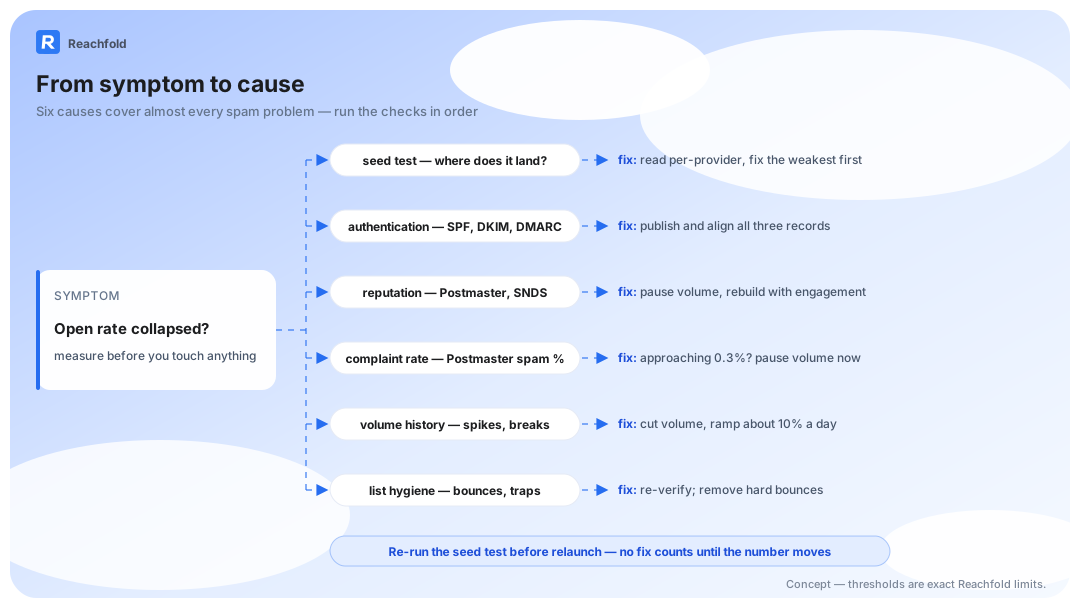
Run the steps in order; each either finds the cause or clears it.
- Run a seed placement test to measure your inbox rate on Gmail, Outlook, and Yahoo. That number is your baseline.
- Verify authentication: confirm SPF, DKIM, and DMARC exist and align with your sending domain.
- Check domain reputation in Google Postmaster Tools and Microsoft SNDS.
- Pull your complaint rate. Anything near Google's 0.3% line needs an immediate volume pause.
- Audit the last 30 days of volume for spikes or pattern breaks.
- Clean the list: remove hard bounces and unengaged addresses, re-verify the rest.
- Re-run the placement test before any relaunch. No fix counts until the number moves.
Seven steps, one afternoon, and you'll know which of the seven causes is yours.
One rule sits above the sequence: you can't diagnose what you don't measure per provider. A blended 70% inbox rate can hide 95% Gmail and 40% Outlook — opposite fixes. Measurement options: seed lists vs placement tests; inbox placement per provider is how we verify the result.
Symptoms and Fixes at a Glance
| Symptom | Likely cause | Fix |
|---|---|---|
| Spam placement from day one | Missing or misaligned SPF, DKIM, DMARC | Publish and align all three, re-test |
| Worked for weeks, then collapsed | Domain reputation damage | Pause volume, rebuild with high engagement |
| Inbox for some, spam for others | Per-provider filtering | Read per-provider breakdowns, fix the weakest |
| Sudden drop after a big send day | Volume spike | Cut daily volume, ramp back gradually |
| Green warmup scores, then launch-day spam | Synthetic warmup from a rented pool | Warm on real replies from your audience (real-lead warmup) |
| High bounces plus spam placement | Dirty list, possible traps | Re-verify the list, remove hard bounces |
| Complaint warnings in Postmaster | Rate near 0.3% | Pause, ease unsubscribing, cut bad sources |
Gmail, Outlook, and Yahoo Filter You Separately
Providers score your domain independently, so the same campaign can pass at one and fail at another. Read the folder, run the isolation test for that provider, and fix there first.
| What you see | Most likely cause | The test that isolates it | The fix |
|---|---|---|---|
| Gmail: bulk folder or missing from inbox | Spam rate near 0.3%, or broken alignment | Postmaster spam rate; header check of SPF/DKIM/DMARC | Cut complaint sources, realign records, re-test |
| Outlook: mail lands in Junk | IP/domain reputation at Microsoft, plus content signals | Placement test Junk vs inbox; sending IPs in SNDS | Rebuild reputation at low volume; strip link-heavy layouts |
| Yahoo: mail lands in bulk or spam | Complaint signals and list quality | Feedback-loop hits and bounce rates | Verify the list, ease unsubscribing, suppress complainers |
Fix the weakest provider first. And ISP vs ESP decides where "delivered" actually lands.
Frequently Asked Questions
How do I know if my emails are going to spam?
Watch for a sudden open-rate collapse, replies stopping, and clicks flatlining across a segment. Those point to filtering, not bad copy. Confirm with a placement test: identical emails to seed inboxes at Gmail, Outlook, and Yahoo, scored by folder. Open rates alone can't tell you; Apple Mail Protection inflates them.
What spam complaint rate is safe?
Google's sender guidelines require bulk senders to keep the complaint rate in Postmaster Tools below 0.3% — three complaints per 1,000 delivered emails. Stay well under it, because rates creep as volume grows. A one-click unsubscribe header (RFC 8058) helps too: recipients who can leave in one click rarely reach for the report button.
Will switching to a new domain fix spam placement?
No. A new domain resets reputation to zero, and zero history filters almost as badly as bad history. If you must migrate, verify authentication, warm with a controlled ramp, and test placement before campaigns. In most cases, repairing your current domain beats starting over.
Can email content alone send you to spam?
Rarely as the primary cause. Filters weigh reputation, authentication, and engagement far more heavily than wording; content acts as a tiebreaker when everything else is marginal. Fix infrastructure and list quality first, then test copy variants against measured placement, not gut feel.
How long do fixes take to restore inbox placement?
Authentication fixes can propagate within 24 to 48 hours, and filter response often follows within a week. Reputation damage takes longer: expect two to four weeks of clean, low-volume sending before placement recovers. Cut bounce and complaint sources first — the recovery clock starts when the damage stops.
Can a warmed domain still land in spam?
Yes, and the most common reason is synthetic warmup. Engagement from a rented pool describes the network, not your domain, so campaign day breaks the pattern filters learned and placement drops. If your history came from a pool, rebuild it on real replies from your target audience (real-lead warmup), then verify with a placement test before you scale.
Do cold emails need DMARC?
If you send at bulk volume to Google or Yahoo addresses, yes. Both require SPF, DKIM, and DMARC from bulk senders, enforced with filtering. Publish a DMARC policy aligned with your SPF and DKIM records, start in monitoring mode, tighten once reports confirm clean alignment.
Why do my emails land in spam only on Outlook?
Each provider scores reputation independently, so Gmail can pass you while Microsoft's junk filters catch you. Outlook leans on IP and domain reputation (visible through SNDS) plus content signals like links and attachments. Run a placement test per provider, check your IPs in SNDS, fix the weakest channel first.
Where to Start
Most spam problems die from one mechanical fix: aligned authentication, a verified list, a ramp that doesn't spike, and warmup built on real replies instead of a rented pool. Run the diagnostic sequence, fix what it finds, and re-test placement once to confirm the fix worked. To go deeper: our deliverability audit checklist, our deliverability myths, and the cold email subject lines breakdown. When you want the loop enforced for you, Reachfold runs it on every paid plan (pricing).